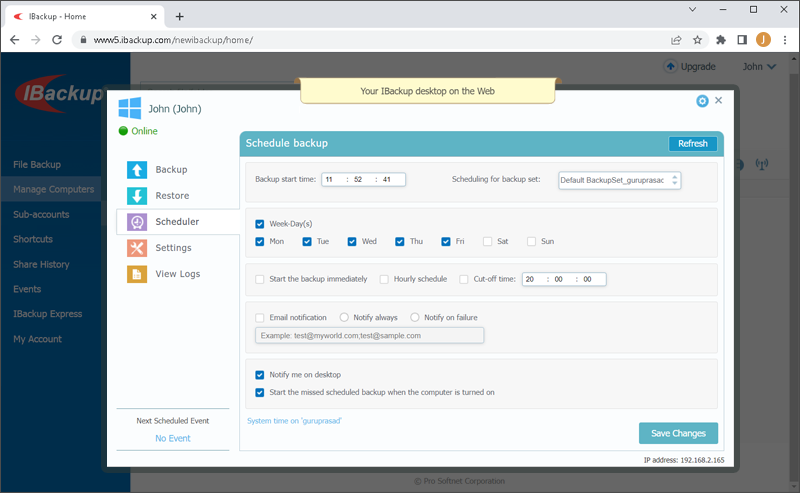
Schedule Manager
You can modify the scheduler parameters and schedule backup remotely as per your convenience.
To schedule a backup,
To schedule a backup,
- Click

 under the computer name or go the Scheduler tab.
 - On the Schedule Backup screen, modify the following parameters:
- Scheduling for backup set - Choose a backup set to schedule.
- Backup start time - Set the time at which your scheduled backup should start.
- Daily schedule - To run your backup jobs daily, select this option. You can also set specific days for backup.
Week-Day(s) - Select the days of the week on which you want to run your backup jobs.
- Start the backup immediately - Select this option to start a backup job immediately.
- Cut-off time - Set the time at which your scheduled backup should stop. This is helpful if you want to stop the backup process at a specific time.
- Email notification - Select the check box and enter your email address to receive backup status notifications via emails.
- Notify me on desktop - Select the check box to receive backup notifications on your desktop.
- Start the missed scheduled backup when computer is turned on - On selecting this option, your missed scheduled backups will start automatically once you turn on your computer.